Getting verified: your account and buyer level
See where your buyer level (G0 to G3) lives on your account page, request identity (KYC) and proof-of-funds checks, and learn why verification unlocks confidential dossiers faster.
Key takeaways
- Your account page shows your current buyer level (G0 to G3) alongside your KYC and proof-of-funds status.
- G0 is a new account; G1 means your identity is KYC verified; G2 and G3 add further vetting, including proof of funds.
- Verification helps unlock a deal's confidential dossier faster, since each unlock needs you verified plus a deal-specific NDA and a deal-scoped access grant.
- Sellers can see your buyer level, so a higher grade signals you are a serious, ready buyer.
- Your dashboard is the hub for tracking active deals and reaching your advisor for help with verification.
On Online Asset, verification is what turns a browsing account into a buyer that sellers trust and that can unlock a deal's confidential details. Your buyer level runs from G0 (a brand new account) up to G3 (further vetted), and it sits right on your account page next to your identity and funds checks.
This tutorial walks you through the two screens you will use most: your profile and verification panel, where you see your level and request checks, and your dashboard, where you track deals and reach your advisor if you need a hand.
Step 1: Open your account and find your verification status
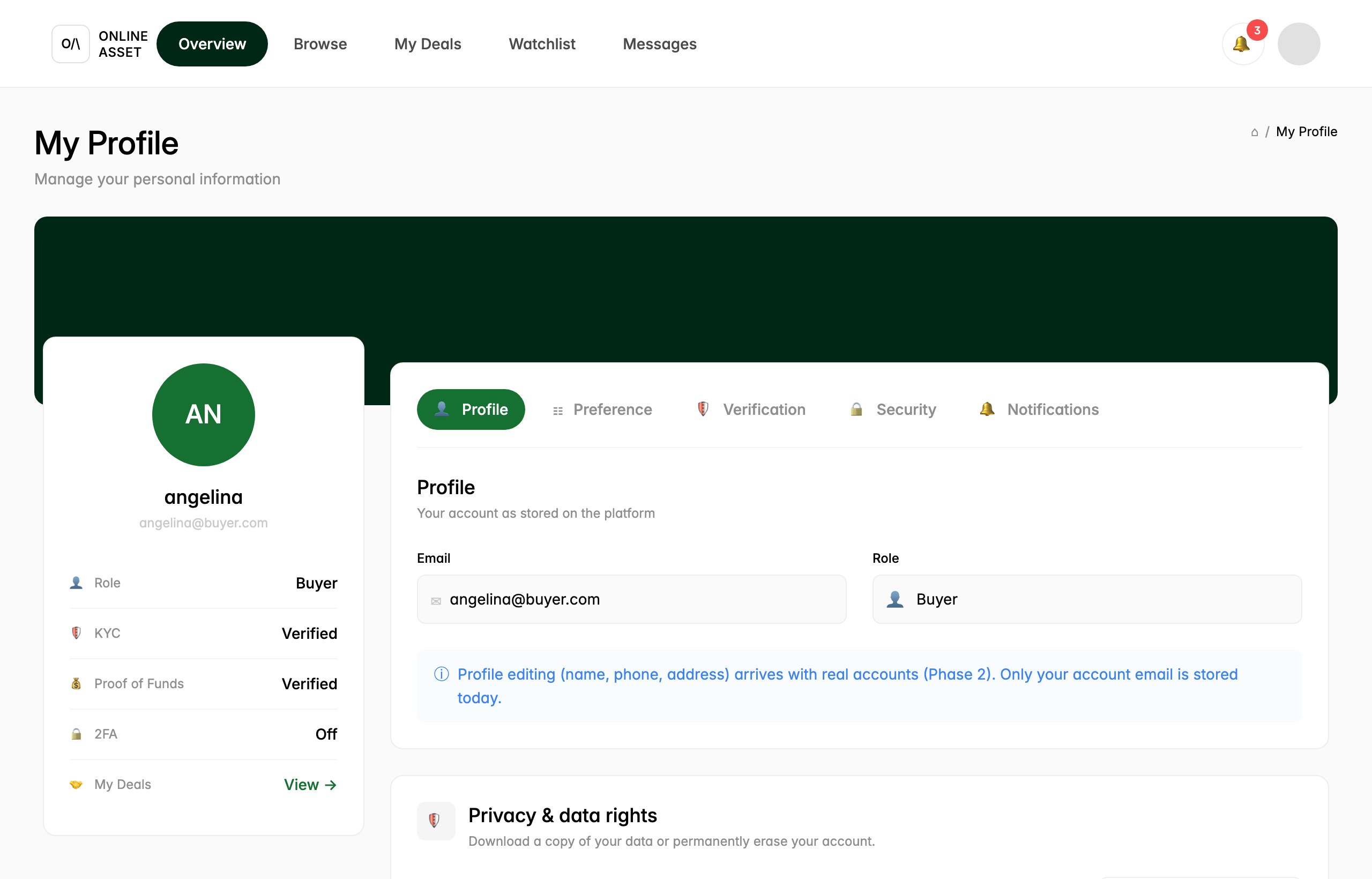
Click your profile avatar in the top right, then open My Profile. The card on the left shows your account at a glance: your name, your Role (Buyer), and your verification status. Here you can read your KYC (identity) and Proof of Funds rows, each marked Verified or not yet done, plus whether 2FA is on.
To request or review checks, select the Verification tab in the panel on the right (the shield icon next to Profile and Preference). This is where identity (KYC) and proof-of-funds verification are handled. Getting KYC verified moves you from G0 to G1; adding proof of funds and further vetting takes you toward G2 and G3. It matters because unlocking a deal's confidential dossier requires you verified, plus a deal-specific NDA signed and a deal-scoped access grant, so clearing verification early means fewer waits later. Sellers can also see your buyer level, so a higher grade signals you are ready to transact.
Step 2: Track deals and get help from your dashboard
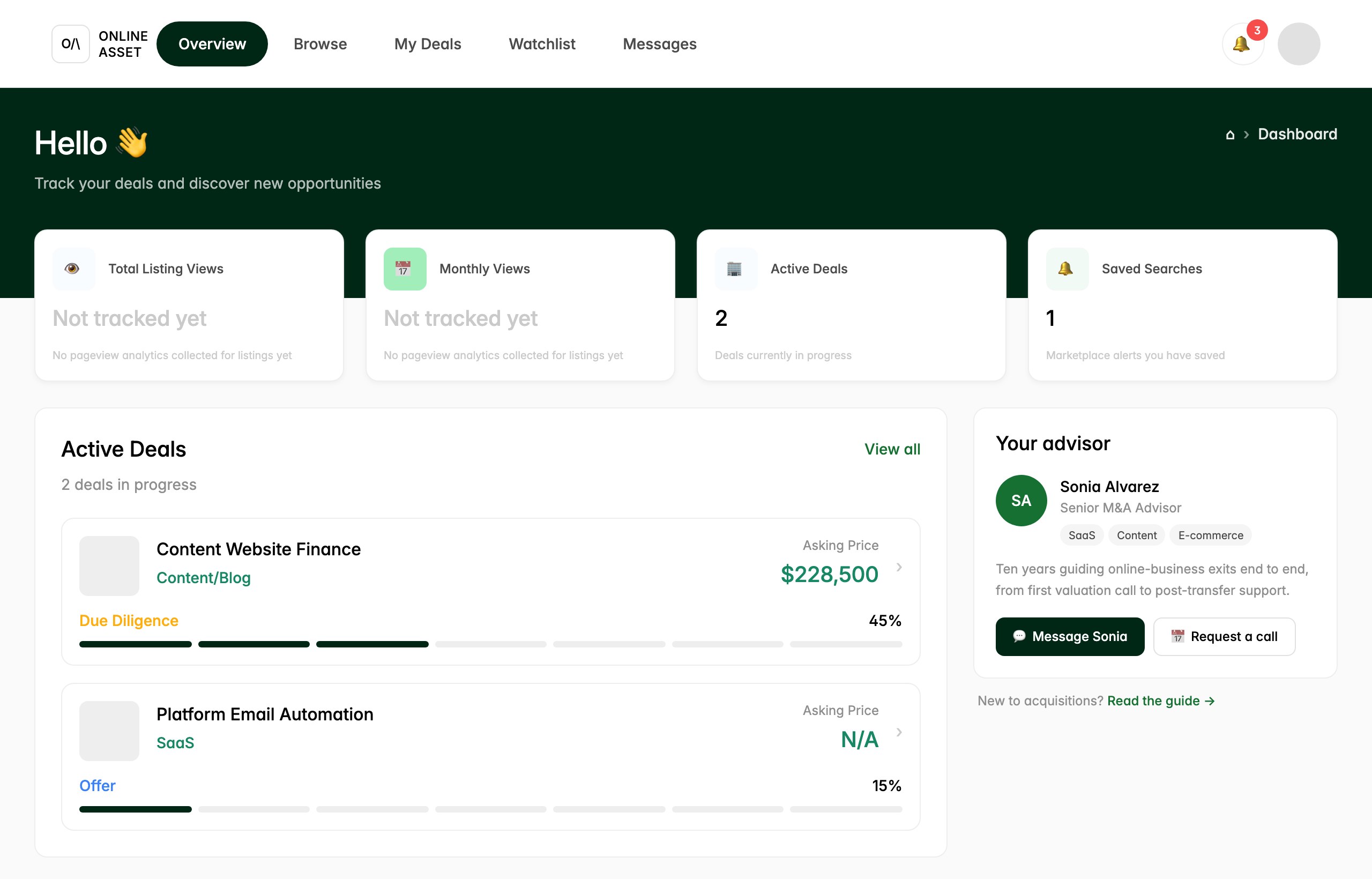
Click Overview in the top navigation to reach your dashboard. This is your home base: cards across the top show listing views, your Active Deals count, and Saved Searches, while the Active Deals list shows each deal you are working, its category, asking price, and current stage (for example Due diligence or Offer) with a progress bar across the ten stages.
On the right you will see Your advisor, the named person who accompanies you through the process. If a verification step is unclear or you want to unlock a dossier on a specific deal, use Message or Request a call to reach them. Your advisor can walk you through KYC and proof of funds and coordinate the deal-specific NDA and access grant that open the confidential details.
That is the full loop: confirm your level and clear KYC and proof of funds on your account page, then use your dashboard to keep deals moving and lean on your advisor whenever a step needs a second pair of hands.
Try it yourself.
Follow the steps in the real product. A named advisor is assigned the moment you start.