Messaging and working with your advisor
A quick walkthrough of the Messages screen, where your named advisor accompanies you through the deal, responds to your questions, and where you can request a call.
Key takeaways
- Every buyer and seller gets a named advisor, and Messages is where you reach them.
- Open the pinned advisor thread and type in the composer to start the conversation.
- Sometimes two advisors work your deal (a specialist plus a supervisor), and both simply show up as your advisors in the same thread.
- You can also ask your advisor to set up a call right inside the thread.
- The advisor model is human: real people accompany you and can act on steps with you once you approve the big decisions.
On Online Asset you are never working a deal alone. Every buyer and seller is paired with a named advisor, a real person who accompanies you from your first inquiry all the way to closing. The Messages screen is where that relationship lives.
This short tutorial shows you what the Messages screen looks like, how to open your advisor thread, how the advisor (and sometimes a second advisor) responds, and how to ask for a call. It is all handled by people, so treat it like a direct line to your team.
Step 1: Open Messages and start your advisor thread
Click Messages in the top navigation. The pill turns dark when you are on the screen, and the page opens with a two-panel layout: a list of your conversations on the left and the open conversation on the right. The subtitle at the top confirms what this space is for: communicate with advisors and sellers about listings and deals.
In the left list you will see your advisor thread pinned to the top, labeled with your advisor's name and a green Advisor tag (in this example, Sonia Alvarez, Your advisor). Click it to open the thread. When there is no history yet, the panel simply reads No messages yet, so type your question in the Write a reply box at the bottom and click Send. Your advisor answers right here in the same thread. If two advisors work your deal (a specialist plus a supervisor), they both appear to you simply as your advisors in this conversation, so you never have to track who is who. Need to talk live? Just send a message asking to set up a call, and your advisor will arrange it and keep the deal room updated.
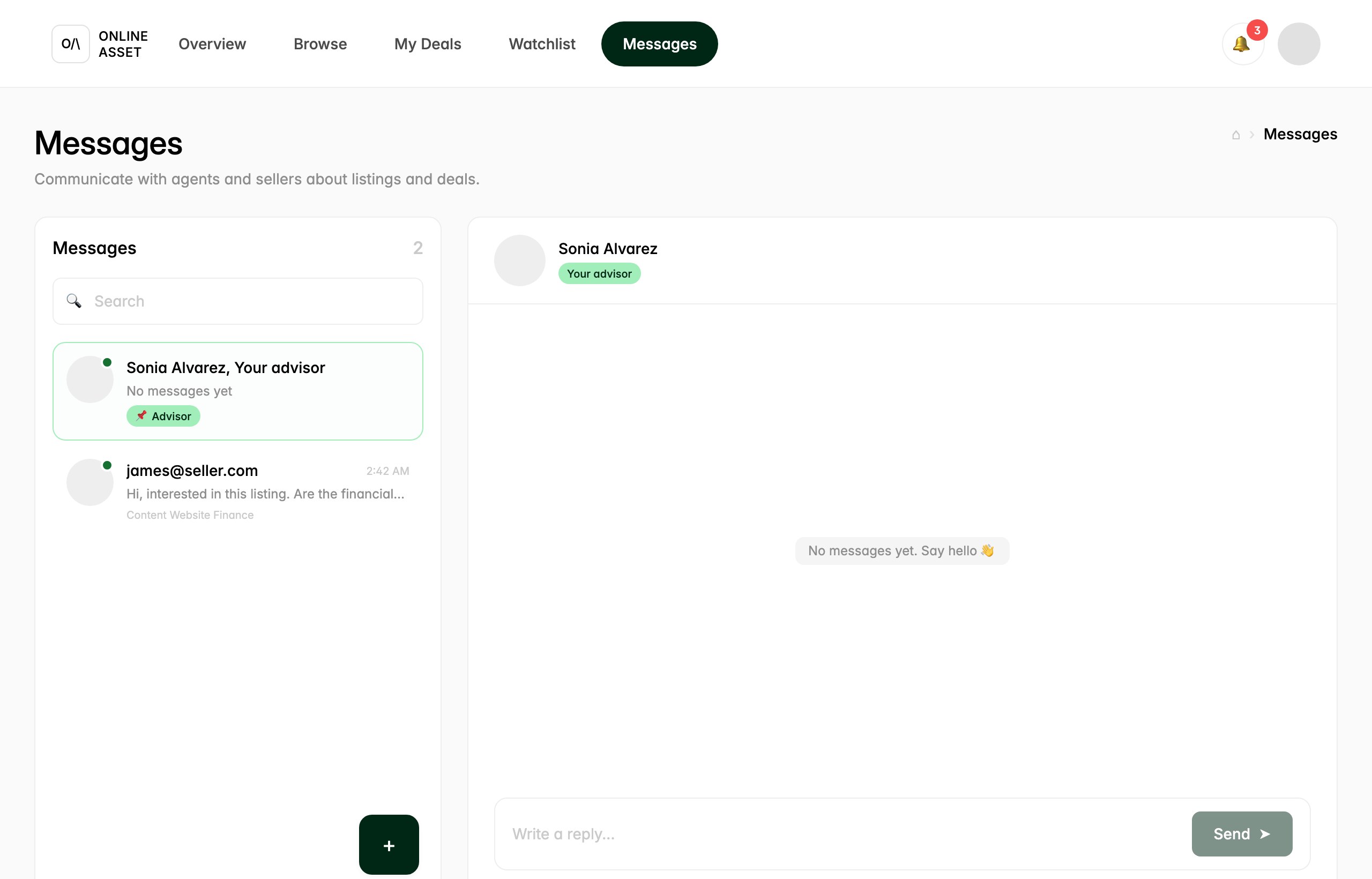
That is the whole loop: open the thread, send your question, and your named advisor takes it from there. Because the model is human, you can ask for a call, request help on a specific step, or just check in, and the same team stays with you through all ten stages of the deal.
Try it yourself.
Follow the steps in the real product. A named advisor is assigned the moment you start.